C# Read Data From Excel File
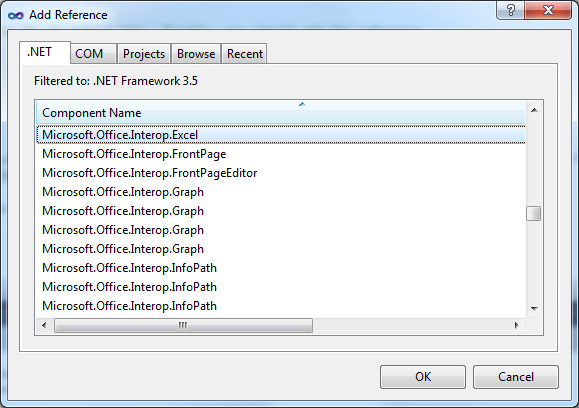
This example shows how to read data from excel file using C#. To achive this, firstly, we need to add a reference to the dynamic link library for Excel which is called Microsoft.Office.Interop.Excel.dll. Firstly, go to your solution explorer and click on add a reference. Then, add Microsoft.Office.Interop.Excel.dll.
Also you must add the using to the following code.
using Excel = Microsoft.Office.Interop.Excel;
Usage:
        public void ReadSample()
        {
            Excel.Application excelApp = new Excel.Application();
            if (excelApp != null)
            {
                Excel.Workbook excelWorkbook = excelApp.Workbooks.Open(@"C:\test.xls", 0, true, 5, "", "", true, Excel.XlPlatform.xlWindows, "\t", false, false, 0, true, 1, 0);
                Excel.Worksheet excelWorksheet = (Excel.Worksheet)excelWorkbook.Sheets[1];

                Excel.Range excelRange = excelWorksheet.UsedRange;
                int rowCount = excelRange.Rows.Count;
                int colCount = excelRange.Columns.Count;

                for (int i = 1; i <= rowCount; i++)
                {
                    for (int j = 1; j <= colCount; j++)
                    {
                        Excel.Range range = (excelWorksheet.Cells[i, 1] as Excel.Range);
                        string cellValue = range.Value.ToString();

                        //do anything
                    }
                }

                excelWorkbook.Close();
                excelApp.Quit();
            }
        }