03 Tem

C# Sequential Search Example

Sequential search(Linear search) is the simplest search algorithm. It is a special case of brute-force search. It is a method for finding a particular value in a list. To achieve this, it checks every one of its elements one.

Usage:

            //Sorted array
            int[] arr = new int[10]
            {
                1, 2, 4, 11, 20, 28, 48, 84, 96, 106
            };

            int index = SequentialSearch(arr, 20);
            Console.WriteLine("Index of 20 value in array is " + index.ToString());    
            
            //Output:
            //Index of 20 value in array is 4

Sequential Search Implementation:

        private int SequentialSearch(int[] arr, int searchNumber)
        {
            arr[arr.Length - 1] = searchNumber;
            
            int i;
            for (i = 0; arr[i] != searchNumber; i++);
            return (i < arr.Length -1) ? i : -1;
        }

See Also:
Binary Search
03 Tem

C# Binary Search Example

Binary search or half-interval search algorithm finds the position of a specified input value (the search “key”) within an array sorted by key value.
For more information about Binary Search:
http://en.wikipedia.org/wiki/Binary_search_algorithm

This examples shows how to search an item in an array using binary search.

Usage:

            //Sorted array
            int[] arr = new int[10]
            {
                1, 2, 4, 11, 20, 28, 48, 84, 96, 106
            };

            int index1 = arr.ToList().BinarySearch(20);
            int index2 = BinarySearchIterative(arr, 20);
            int index3 = BinarySearchRecursive(arr, 20, 0, arr.Length - 1);
            Console.WriteLine("Index of 20 value in list is " + index1.ToString() + " (using .NET Frameowork)");
            Console.WriteLine("Index of 20 value in list is " + index2.ToString() + " (using BinarySearchIterative method)");
            Console.WriteLine("Index of 20 value in list is " + index3.ToString() + " (using BinarySearchRecursive method)");

            //Output:
            //Index of 20 value in list is 4 (using .NET Frameowork)
            //Index of 20 value in list is 4 (using BinarySearchIterative method)
            //Index of 20 value in list is 4 (using BinarySearchRecursive method)

Iterative and recursive methods:

 
        private int BinarySearchIterative(int[] arr, int searchNumber)
        {
            int left = 0;
            int right = arr.Length - 1;

            int middle;
            while (left <= right)
            {
                middle = (left + right) / 2;
                switch (Compare(arr[middle], searchNumber))
                {
                    case -1: left = middle + 1; break;
                    case 0: return middle;
                    case 1: right = middle - 1; break;
                }
            }
            return -1;
        }

        private int BinarySearchRecursive(int[] arr, int searchnum, int left, int right)
        {
            int middle;
            while (left <= right)
            {
                middle = (left + right) / 2;
                switch (Compare(arr[middle], searchnum))
                {
                    case -1: return BinarySearchRecursive(arr, searchnum, middle + 1, right);
                    case 0: return middle;
                    case 1: return BinarySearchRecursive(arr, searchnum, left, middle - 1);
                }
            }
            return -1;
        }

        private int Compare(int x, int y)
        {
            return x < y ? -1 : (y < x ? 1 : 0);
        }

See Also:
Sequential Search(Linear Search)

27 Haz

C# Chart Control Example

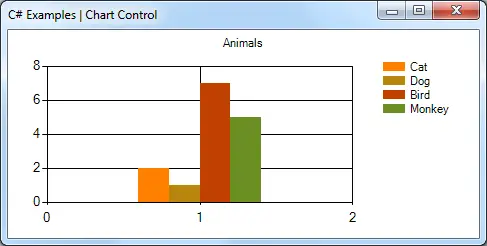
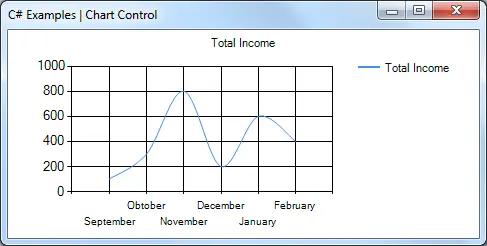
This example shows how to display your data in your Windows Forms program as a bar graph or spline chart. To achieve this, you use Chart class in System.Windows.Forms.DataVisualization.Charting. Chart control can be found in Toolbox(.NET Framework 4.0 or newer). Older versions will not have the Chart control available.
To add a chart control to your application,

  • In design view, open the Toolbox.
  • From the Data category, drag a Chart control to the design area.

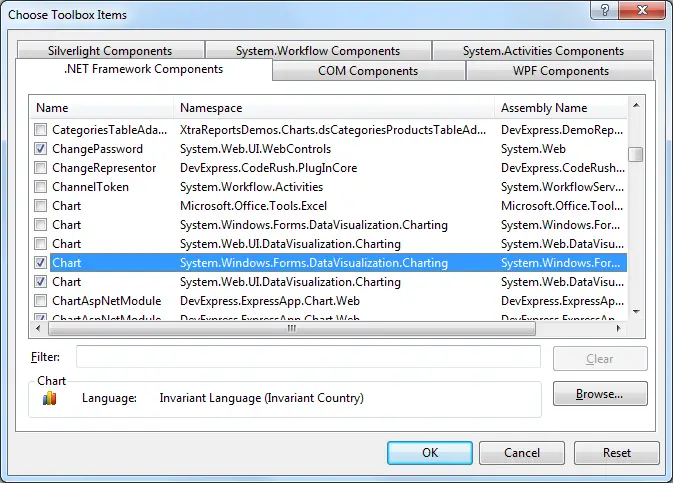
If you cannot see the Chart control in the Toolbox, right click in the Toolbox, select Choose Items, and then select the following namespaces in the .NET Framekwork Components tab:

  • System.Web.UI.DataVisualization.Charting
  • System.Windows.Forms.DataVisualization.Charting

C# Winform Choose Toolbox Items

Usage:

        void FrmChartExample_Load(object sender, EventArgs e)
        {
            BarExample(); //Show bar chart
            //SplineChartExample();
        }


This method shows how to add a bar chart.

        public void BarExample()
        {
            this.chartControl.Series.Clear();

            // Data arrays
            string[] seriesArray = { "Cat", "Dog", "Bird", "Monkey" };
            int[] pointsArray = { 2, 1, 7, 5 };

            // Set palette
            this.chartControl.Palette = ChartColorPalette.EarthTones;

            // Set title
            this.chartControl.Titles.Add("Animals");

            // Add series.
            for (int i = 0; i < seriesArray.Length; i++)
            {
                Series series = this.chartControl.Series.Add(seriesArray[i]);
                series.Points.Add(pointsArray[i]);
            }
        }

C# Bar Chart Example

This method shows how to add a spline chart.

        private void SplineChartExample()
        {
            this.chartControl.Series.Clear();

            this.chartControl.Titles.Add("Total Income");

            Series series = this.chartControl.Series.Add("Total Income");
            series.ChartType = SeriesChartType.Spline;
            series.Points.AddXY("September", 100);
            series.Points.AddXY("Obtober", 300);
            series.Points.AddXY("November", 800);
            series.Points.AddXY("December", 200);
            series.Points.AddXY("January", 600);
            series.Points.AddXY("February", 400);
        }

C# Spline Chart Example

26 Haz

C# Indent String With Spaces

This example shows how to indent strings using method for padding in C#. “String.PadLeft” static method is used to repeat spaces.

Usage:

            Console.WriteLine(Indent(0) + "Versions");
            Console.WriteLine(Indent(2) + "Version 1");
            Console.WriteLine(Indent(4) + "Version 1.1");
            Console.WriteLine(Indent(4) + "Version 1.2");
            Console.WriteLine(Indent(6) + "Version 1.2.1");
            Console.WriteLine(Indent(2) + "Version 2");
            Console.WriteLine(Indent(4) + "Version 2.1");
            Console.WriteLine(Indent(4) + "Version 2.2");
        public static string Indent(int count)
        {
            return "".PadLeft(count);
        }

Output is like below.

Versions
  Version 1
    Version 1.1
    Version 1.2
      Version 1.2.1
  Version 2
    Version 2.1
    Version 2.2
25 Haz

C# Update A GUI Element From Another Thread

This examples shows how to update a user interface element from another thread. To do this, we must update to the user interface in user interface thread. Invoke method in Control class implements this task.

Sample Usage:

            //Usage 1
            txtSampleTextBox.Invoke(new Action(() => txtSampleTextBox.Text = "Sample Text"));

            //Usage 2
            txtSampleTextBox.Invoke((MethodInvoker)(() => txtSampleTextBox.Text = "Sample Text"));