19 Haz

C# All Need To Know About Reflection

Reflection is the ability of a managed code to read its own metadata at runtime. .NET Framework allows us the type information. For example, we can learn to the method names of a given type in C#. To do this, we use the “GetMethods” method in System.Type class.

    /// 
    /// Sample class
    /// 
    public class ReflectionExample
    {
        public void SampleMethod1(string message)
        {
            Console.WriteLine("My name is SampleMethod1");
            Console.WriteLine("Your message is " + message);
        }

        public void SampleMethod2(int id)
        {
            Console.WriteLine("My name is SampleMethod2");
            Console.WriteLine("Your id is " + id.ToString());
        }
    }

Usage:

            MethodInfo[] allMethods = typeof(ReflectionExample).GetMethods();
            foreach (MethodInfo method in allMethods)
            {
                Console.WriteLine("MethodName=" + method.Name + " "+
                                  "IsPublic=" + method.IsPublic.ToString());
            }

            //Output:
            //MethodName=SampleMethod1 IsPublic=True
            //MethodName=SampleMethod2 IsPublic=True
            //MethodName=ToString IsPublic=True
            //MethodName=Equals IsPublic=True
            //MethodName=GetHashCode IsPublic=True
            //MethodName=GetType IsPublic=True

ToString, Equals, GetHashCode and GetType methods are founded in object class. So “GetMethods” method returns these methods, too. Using reflection, we can also fetch the parameters of a method.

            MethodInfo m = typeof(ReflectionExample).GetMethod("SampleMethod1");
            ParameterInfo[] parameters = m.GetParameters();
            foreach (ParameterInfo p in parameters)
            {
                Console.WriteLine("Parameter Name=" + p.Name + " " +
                                  "Type=" + p.ParameterType.Name);
            }

            //Output:
            //Parameter Name=message Type=String

Also we can create an instance of a given type and invoke its methods or properties at runtime without compiling.
This technology is named as “Late binding” or “Dynamic Invocation” in .NET. Following sample shows the sample usage.

            Type type = typeof(ReflectionExample);
            object obj = Activator.CreateInstance(type);
            MethodInfo mi = type.GetMethod("SampleMethod1");
            mi.Invoke(obj, new object[]
            {
                "Hello Method!"
            });

            //Output:
            //My name is SampleMethod1
            //Your message is Hello Method!
18 Haz

[Flags] Enum Attribute And Bitwise Operation In C#

The flags attribute should be used whenever the enumerable represents a collection of flags, rather than a single value. We must use multiples of two in our enumeration to use bitwise operations. Such collections are usually manipulated using bitwise operators, For example:

MyColors themeColors = MyColors.Yellow | MyColors.Red;

Example enum decleration:

    [Flags]
    public enum MyColors : int
    {
        Yellow  = 1,
        Green   = 2,
        Red     = 4,
        Blue    = 8,
        Orange  = 16,
        Black   = 32,
        White   = 64,
    }

The flags attribute doesn’t change enum values. It is enable a nice representation by the .ToString() method:

"themeColors.ToString" =>  "Yellow, Red"

Enumeration values looks like this:
Yellow = 0000001
Green = 0000010
Red = 0000100
Blue = 0001000
Orange = 0010000
Black = 0100000
White = 1000000

themeColors instance looks like this:
themeColors = 0000101

To retrieve the distinct values in our property one can do this,
Usage:

            if ((themeColors & MyColors.Red) == MyColors.Red)
            {
                Console.WriteLine("Red is a theme color.");
            }

            if ((themeColors & MyColors.Green) == MyColors.Green)
            {
                Console.WriteLine("Green is a theme color.");
            }

themeColors is 0000101
MyColor.Red is 0000100
———————————–(BITWISE AND)
Result is 0000100 -> It is a red color

Also we can use the bit-shifting for setting the enum values. It is more simple and more readable.
Example enum decleration using bit-shifting:

    /// 
    /// using bit-shifting
    /// 
    [Flags]
    public enum MyColors_SetValuesWithBitShifting
    {
        Yellow  = 1 << 0,
        Green   = 1 << 1,
        Red     = 1 << 2,
        Blue    = 1 << 3,
        Orange  = 1 << 4,
        Black   = 1 << 5,
        White   = 1 << 6,
    }
18 Haz

C# Notify Icon Example

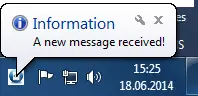
A notification icon notifies the user. In Windows there is a Notification Icons section, typically in the bottom right corner. To create a notify icon application, we use NotifyIcon instance in System.Windows.Forms namespace.

Example Code:

            NotifyIcon trayIcon = new NotifyIcon();    
            trayIcon.Icon = new Icon(@"C:\csharp.ico");
            trayIcon.Text = "New message";
            trayIcon.Visible = true;
            trayIcon.ShowBalloonTip(2000, "Information", "A new message received!", ToolTipIcon.Info);
screenshot of notify icon

screenshot of notify icon

17 Haz

Get Enum Description From Value in C#

The enum keyword is used to declare an enumeration, a distinct type that consists of a set of named constants called the enumerator list. We can define the attributes for enum and if you want to fetch these description simply, we can use as shown below.

Usage:

            string description = EnumHelper.StringValueOf(SiteType.Technology);
            Console.WriteLine(description);
            //Output:
            //This is a technology site.

Sample Code:

    public class EnumHelper
    {
        public static string StringValueOf(Enum value)
        {
            FieldInfo fi = value.GetType().GetField(value.ToString());
            DescriptionAttribute[] attributes = (DescriptionAttribute[])fi.GetCustomAttributes(typeof(DescriptionAttribute), false);
            if (attributes.Length > 0)
            {
                return attributes[0].Description;
            }
            else
            {
                return value.ToString();
            }
        }
    }
17 Haz

Print Fibonacci Sequence With Recursive And Iteratively In C#

Fibonacci sequence is a sequence of numbers where the next number is the sum of the previous two numbers behind it. It has its beginning two numbers predefined as 0 and 1. The sequence goes on like this:
0,1,1,2,3,5,8,13,21,34,55,89,144,233,377…

Usage:

            Console.WriteLine("Iterative:");
            for (int i = 0; i < 15; i++)
            {
                Console.Write(CalculateFibonacciNumberIteratively(i) + " ");
            }

            Console.WriteLine();
            Console.WriteLine("Recursive:");
            for (int i = 0; i < 15; i++)
            {
                Console.Write(CalculateFibonacciNumberRecursively(i) + " ");
            }

            //Output window is like follow.

            //Iterative:
            //0 1 1 2 3 5 8 13 21 34 55 89 144 233 377
            //Recursive:
            //0 1 1 2 3 5 8 13 21 34 55 89 144 233 377

Iterative Method:

        private int CalculateFibonacciNumberIteratively(int n)
        {
            int result = 0;
            int previous = 1;

            for (int i = 0; i < n; i++)
            {
                int temp = result;
                result = previous;
                previous = temp + previous;
            }
            return result;
        }

Recursive Method:

        private int CalculateFibonacciNumberRecursively(int n)
        {
            if (n == 0)
                return 0;
            else if (n == 1)
                return 1;
            else
                return CalculateFibonacciNumberRecursively(n - 2) + CalculateFibonacciNumberRecursively(n - 1);
        }